Gökhan Yıldan

A Space for My Notes

Menu
  • Home
  • About Me
  • Tools
  • Contact
Menu

Check Which Task Sequence Contains a Specific Package

Posted on 31/01/202506/06/2026 by Gokhan Yildan

Hello,

In this post, I will share a script to identify which SCCM Task Sequences include specific SCCM Packages.

Let’s say we have several packages that we would like to delete, but we’re unsure whether these packages are utilized in any task sequences. Therefore, we want to ensure that none of the task sequences are using them.

Download the script from the link below.
https://github.com/gokhanyildan/SCCMScripts/blob/main/SCCMTS-PackageFinder.ps1

We have some packages we would like to delete.

First, we can create a CSV file containing the Package IDs of all the packages we want to check.

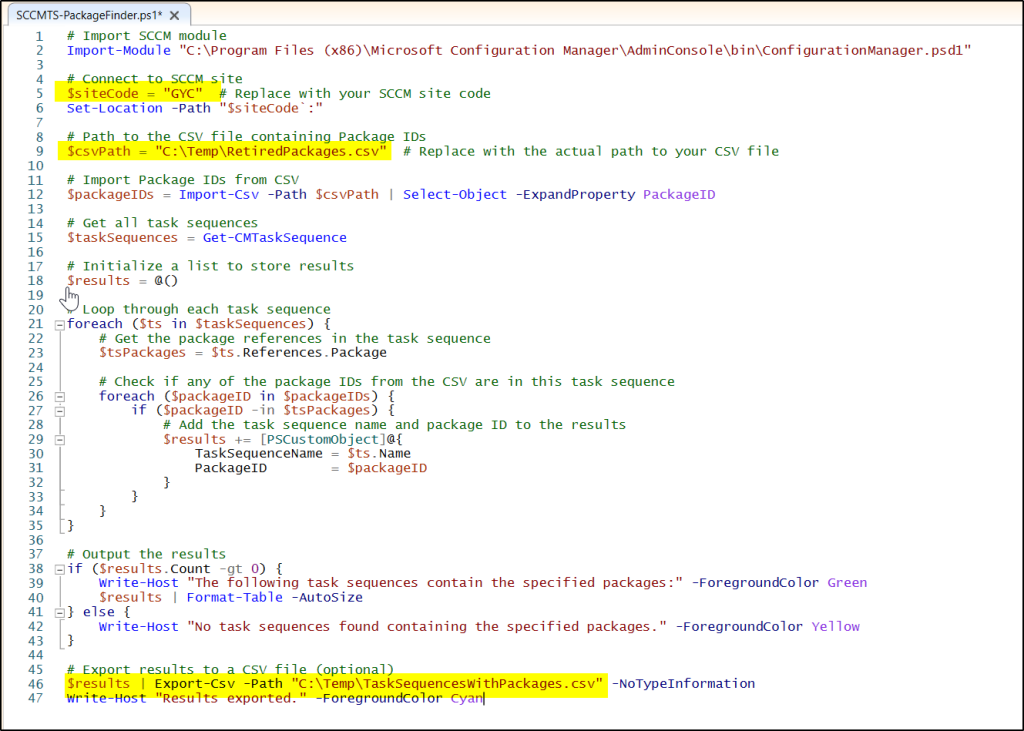
You will need to edit the following variables in the script (highlighted in yellow):

  • $SiteCode
  • $csvPath
  • $results

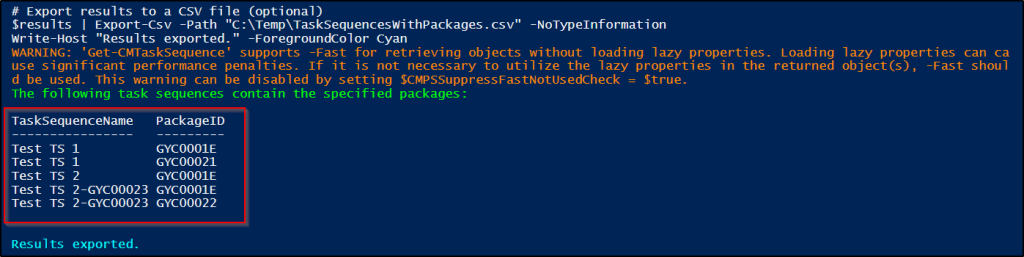
When you run the script, it will list all the task sequences where the specified packages are used.
Thanks.

Note:
I developed this script with the help of DeepSeek. While I have tested it numerous times, use it at your own risk.

Category: Powershell

Post navigation

← Resolve CrowdStrike Issue Using Powershell and SCCM
Free Up Disk Space on SCCM DPs Using ContentLibraryCleanup.exe →

Leave a Reply Cancel reply

Your email address will not be published. Required fields are marked *

SOCIAL MEDIA

LinkedIn
Twitter
RSS
Follow by Email

RECENT POSTS

  • Free Up Disk Space on SCCM DPs Using ContentLibraryCleanup.exe
  • Check Which Task Sequence Contains a Specific Package
  • Resolve CrowdStrike Issue Using Powershell and SCCM
  • Driver Import Problemi – Some driver(s) can not be imported successfully.
  • IPerf Aracı İle Network Kapasite ve Performans Analizi

ARCHIVE

  • November 2025
  • January 2025
  • July 2024
  • June 2024
  • May 2024
  • April 2024
  • February 2024
  • December 2023
  • November 2023
  • June 2023
  • March 2023
  • February 2023

CATEGORIES

  • Applications
  • Baseline
  • Client Troubleshooting
  • CMG
  • Distribution Point
  • Dynamic Collection
  • Imaging
  • Inplace Upgrade
  • Networking
  • Optimization
  • PKI
  • Power BI
  • Powershell
  • Prerequisites Error/Warning
  • PXE
  • SCCM (MECM)
  • Site Recovery
  • SQL
  • SRSS
  • SUP
  • Task Sequence
  • Troubleshooting
  • Windows PC
  • Windows Server
  • Windows Update
  • WSUS

LABELS

AnyDesk Azure Build Geçişi Certification Config Man Config Mgr English Feature Kaldırmak Maintenance Task MEMCM Nasıl Yapılır? PXE Responder SCCM (MECM) Script Software Update Sorun Giderme SQL Reporting SSL/PKI Türkçe Upgrade Windows 10/11

© 2026 Gökhan Yıldan | Powered by Minimalist Blog WordPress Theme